💡 O VOV Smart Care Pet GPS Tracker suporta múltiplas tecnologias de posicionamento, incluindo GPS, Wi-Fi, LBS e BLE, permitindo rastreamento preciso em tempo real do seu pet.
💡 Conectividade CAT-1 para VOV Smart Care GPS Tracker, com tecnologia CAT-1, o racker VOV Smart Care GPS Tse beneficia de transmissão de dados mais rápida, cobertura de rede mais ampla e menor consumo de energia, permitindo um rastreamento em tempo real mais confiável e maior duração da bateria.
A imagem abaixo é um diagrama ilustrando o funcionamento do seu rastreador GPS para pets.
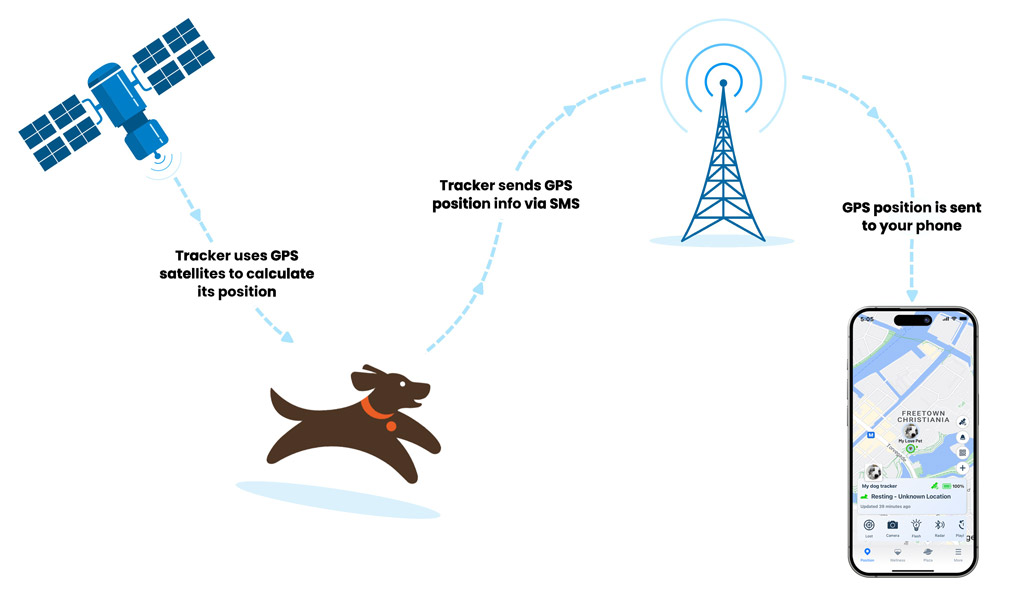
O rastreador GPS para pets depende de sinais GPS e da rede 4G para funcionar corretamente. Você pode verificar o status atual do aparelho através da luz no Pet Tracker e da página de status do dispositivo no app.
A imagem abaixo mostra a página de status do Rastreador no aplicativo, onde você pode ver o sinal GPS e o status do sinal de rede.
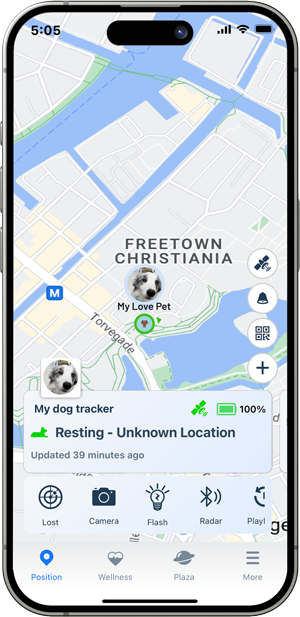
Você também pode verificar a luz do rastreador para confirmar seu status atual. Abaixo está uma explicação do status da luz no Rastreador:
| Comportamento do LED | Descrição de Status |
|---|---|
| 🟠 Flash Red | Cobrança em andamento |
| 🟠 Solid Red | Totalmente carregado |
Aqui está um guia sobre como estender o tempo de uso de um rastreador:
 Ative o Modo de Economia de Energia: Oferecemos o Modo Balanceado, Modo Performance e Modo de Economia de Energia para você escolher. Você pode escolher o modo mais adequado conforme suas necessidades. No modo de economia de energia, o tempo de espera pode durar até um mês.
 Bem-vindo de volta 👋
Faça login para acessar sua conta e continuar de onde parou.
Bem-vindo a bordo 🚀
Crie sua conta para gerenciar facilmente seus pedidos, dispositivos e assinaturas.