🔋 VOV Smart Care Pet Tracker está equipado con una batería de gran capacidad y utiliza múltiples métodos de posicionamiento para optimizar el consumo energético. Permite carga inalámbrica y puedes comprobar el nivel de batería en tiempo real a través de la app. Cuando la batería esté baja, recibirás una notificación para recargar a tiempo. Además, puedes elegir nuestra versión con batería extendida para un uso aún más largo.
💡 Se permite la carga inalámbrica para garantizar una mejor resistencia al agua. Por favor, sigue los consejos de esta guía para mantener el rendimiento y la durabilidad de tu dispositivo.
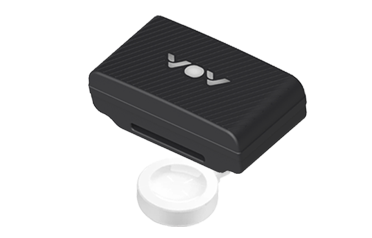
VOV Pet Tracker soporta carga inalámbrica. Para cargarlo, por favor sigue estos pasos:
Utiliza la base de carga inalámbrica incluida que viene con el producto.
Coloca el rastreador plano en la zona central de la base de carga, asegurando la alineación correcta.
Una vez alineado correctamente, el rastreador se enciende automáticamente y comienza a cargar. La luz indicadora se encenderá para indicar que la carga ha comenzado.
CONSEJOS: Puedes tocar el icono de la batería para ver información detallada, incluyendo el nivel actual de batería y el tiempo estimado de uso.⚠️ Solo utiliza la base de carga oficial que viene con el producto para un rendimiento y seguridad óptimos.
🔋 Una carga completa suele tardar entre 4 y 6 horas. Durante la carga, la luz pulsa suavemente. Una vez cargada completa, la luz permanece fija.
📢 El rastreador se encenderá automáticamente cuando empiece a cargar.

También puedes comprobar la luz del rastreador para confirmar el estado actual de la batería. A continuación se explica el estado de la iluminación del rastreador durante la carga:
| Comportamiento de los LEDs | Descripción del estado |
|---|---|
| 🔴 La luz roja parpadeó | Carga |
| 🔴 La luz roja siempre está encendida | Carga completada |
 Estado de la batería: Puedes comprobar el nivel de energía actual del rastreador a través de la app y hacer clic en el icono de la batería para ver información detallada (incluyendo el nivel actual de batería y el tiempo estimado de uso).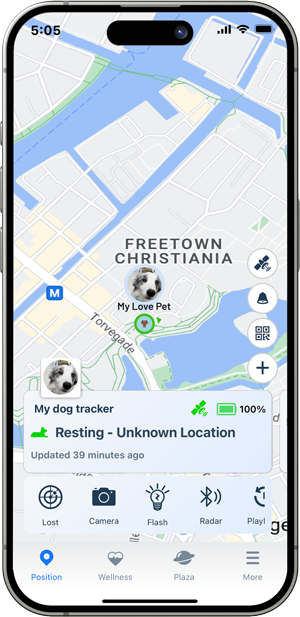
Aquí tienes una guía sobre cómo ampliar el tiempo de uso de un rastreador:
 Modo Trabajo: Ofrecemos Modo Equilibrado, Modo Rendimiento y Modo Ahorro de Energía para que elijas. Puedes seleccionar el modo más adecuado según tus necesidades. En el Modo de Ahorro de Energía, el tiempo de espera puede durar hasta un mes.
  Ajustar el modo de trabajo: Utiliza el modo de ahorro de energía para reducir la frecuencia de las actualizaciones por GPS. Desactiva funciones innecesarias:Desactiva funciones adicionales como la luz si no se necesitan.
La duración del uso de la batería está afectada por varios factores, incluyendo la frecuencia de las actualizaciones de ubicación, el tipo de red utilizada, las condiciones ambientales (temperatura, intensidad de la señal) y el uso de las funciones del rastreador, como luces, sonido, Bluetooth, etc.
Duración estimada de la batería: Puedes tocar el icono de la batería para ver información detallada, incluyendo el nivel actual de batería y el tiempo estimado de uso.Recomendamos usar el cargador que viene con el Tracker para cargarlo, ya que está diseñado específicamente para garantizar un rendimiento óptimo y la seguridad de la carga. Usar un cargador diferente puede afectar la eficiencia de carga o incluso dañar el dispositivo.
⚠️ Nota: Carga el dispositivo en una zona seca y bien ventilada, y evita cargarlo en ambientes húmedos o de alta temperatura para evitar daños al dispositivo o a la batería.

Si tu dispositivo no se está cargando, puede haber varias razones para este problema. Aquí tienes algunos pasos comunes para solucionar problemas que te ayudarán a solucionarlo:
Bienvenido de nuevo👋
Inicia sesión para acceder a tu cuenta y continuar donde lo dejaste.
¡Bienvenido a bordo 🚀
Crea tu cuenta para gestionar fácilmente tus pedidos, dispositivos y suscripciones.